Usage
Use pyDEXPI to import and export, analyze and visualize DEXPI engineering models. This guide covers the Python library, including model objects, serialization, graph analysis, rendering, and synthetic P&ID generation.
For terminal workflows, see the CLI guide; for agent-driven loading, queries, validation and export, see the MCP server guide.
Installation
Install the pyDEXPI package via pip:
Or from GitHub:
For development, clone the repository and install in editable mode:
git clone https://github.com/process-intelligence-research/pyDEXPI
cd pyDEXPI
pip install -e ".[dev]"
Citation
Please reference this software package as:
@InProceedings{pyDEXPI,
  author    = {Goldstein, Dominik P. and Schulze Balhorn, Lukas and Alimin, Achmad Anggawirya and Schweidtmann, Artur M.},
  booktitle = {Proceedings of the 35th European Symposium on Computer Aided Process Engineering (ESCAPE35)},
  title     = {pyDEXPI:{A} {Python} framework for piping and instrumentation diagrams using the {DEXPI} information model},
  year      = {2025},
  address   = {Ghent, Belgium},
  month     = {July},
  doi       = {https://doi.org/10.69997/sct.139043},
}
Getting Started
The following section serves as a guide to start using the package, illustrated with the DEXPI reference P&ID (data/reference_pid.xml © DEXPI e.V.). We recommend studying the DEXPI data model before working with the tool.
pyDEXPI Python Model
The pyDEXPI Python model is derived from the DEXPI data model and implemented using Pydantic. Pydantic provides field type validation; for instance, a pump is not a valid value for a nozzle field. Model-level validation checks relationships and other constraints. Each DEXPI instance gets assigned an ID in the form of a UUID, if not specified differently by the user.
The following DEXPI data types are replaced with default Python classes:
- "String", "NullableString", "AnyURI", "NullableAnyURI" →
str - "Integer", "NullableInteger", "UnsignedByte" →
int - "Double" →
float - "DateTime", "NullableDateTime" →
datetime - "Boolean" →
bool
Serialization
Load and save DEXPI models as XML or JSON using the serializers below. Pickle is also available for Python-specific persistence. Existing Proteus XML files can be imported and converted to DEXPI XML or JSON; Proteus export is not supported.
DEXPI XML
The XML serializer loads and exports DEXPI XML files from a DEXPI model, including drawing information.
from pydexpi.loaders import DexpiXmlSerializer

directory_path = "data"
filename = "reference_pid.xml"
my_loader = DexpiXmlSerializer()
dexpi_model = my_loader.load(directory_path, filename)
The DEXPI XML can be validated via the xsd schema provided by the DEXPI initiative.
from pathlib import Path

xsd_path = Path("DEXPI_XML_Schema.xsd")
xml_path = Path("data/reference_pid.xml")
DexpiXmlSerializer.validate_xml_schema(xml_path, xsd_path)
Characters in string attributes
Carriage returns in string data attributes are written as and survive the round trip
unchanged, so text pasted from a Windows-authored source keeps its CRLF line endings.
The remaining C0 control characters — everything below U+0020 except tab, line feed and carriage
return — have no representation in XML 1.0, as a literal or as a character reference. Export raises
ValueError naming the attribute and the offending code point rather than writing a file that
cannot be read back. JSON has no such restriction, so a model carrying those characters can still be
exported with JsonSerializer.
JSON Format
Every document it writes is JSON a strict parser reads. A DEXPI Double may be a NaN or an
infinity, which JSON has no number for, so a document writes one as the string "NaN",
"Infinity" or "-Infinity"; the loader reads it back as the number, by the attribute it sits
in. pyDEXPI wrote Python's bare NaN and Infinity before, which is not JSON, and still reads
it. JsonSerializer(non_finite="constants") writes that older spelling.
Pickle Format
A pickle is tied to the pyDEXPI classes that wrote it, so it is not a format for exchange or for keeping a model across pyDEXPI versions, and nothing converts it. To move a model between versions, save it as DEXPI XML or JSON, which pyDEXPI converts when it reads an older version.
Unpickling validates nothing: a model pickled under the DEXPI 2.0 classes used to come back under
the 2.0.1 ones without an error, holding fields its classes no longer have and lacking ones they
gained, and failed later. PickleSerializer.load now raises IncompatiblePickleError (a
ValueError) for a pickle written by other classes:
saveappends a stamp to the file: the DEXPI version, the pyDEXPI version and, for every model class and enumeration the pickle holds, a signature of the class (its field names and whether each is data, a composition or a reference).loadreads the stamp before it unpickles anything, and refuses a pickle of another DEXPI version, or one holding a class that is gone or whose fields changed, naming the class. A class the pickle does not hold may change freely. The stamp follows the pickle's own end, so the file is still a plain pickle:pickle.load, and a pyDEXPI from before the stamp, read it as before.- A pickle without a stamp, as pyDEXPI wrote them before, is checked once unpickled: every
object must hold exactly the fields of its class. The error names the first object that does
not, and what it holds or lacks. This check sees field names only, so it cannot tell a field
that kept its name and changed its meaning. An object built with
model_constructand left without some of its fields is refused the same way, since it looks the same; save it withPickleSerializerand the stamp vouches for it.
Only load a pickle you trust
Unpickling runs code the file names, so a pickle from somewhere else can do anything your Python process can. The check above is no protection against that: the stamp is what the file says about itself. Exchange models as DEXPI XML or JSON.
Save and Load
# Save a model
my_serializer.save(dummy_dexpi_model, "dummy_path", "dummy_filename")

# Load a model
dummy_dexpi_model = my_serializer.load("dummy_path", "dummy_filename")
Direct Format Conversion
If you only need to move data between two tree-reference-backed formats — DEXPI XML and JSON — FormatConverter translates one serialization element tree into another without ever building a pyDEXPI model. It is roughly three times faster than loading and re-saving the reference P&ID.
from pydexpi.loaders.json_serializer import JsonSerializationElement
from pydexpi.loaders.tree_ref_base import FormatConverter
from pydexpi.loaders.xml_serializer import DexpiXmlDeserializationElement

with open("data/reference_pid.xml", encoding="utf-8") as f:
    xml_element = DexpiXmlDeserializationElement.load_from_string(f.read())

to_json = FormatConverter(JsonSerializationElement)
json_string = to_json.convert_deser_to_ser(xml_element).export_to_string()
Pass a second factory if the target format needs a dedicated element type for pyDEXPI data types:
converter = FormatConverter(
    serialization_element_factory=my_element_factory,
    dt_serialization_element_factory=my_data_type_element_factory,
)
The same thing is available from the command line with --fast:
Without the flag the CLI parses the file into a pyDEXPI model and re-serializes it, which validates the document. With it, the file is translated directly. If the input is something the converter cannot handle — Proteus XML, or a document using DEXPI classes pyDEXPI does not model — the CLI reports why and falls back to the validated route, so --fast never fails on input that would otherwise convert.
What direct conversion gives up
Because no pyDEXPI model is built, pydantic never validates the data and the loader's ErrorRegistry is never populated. Malformed references and unknown attributes pass through untouched instead of being reported, and a DEXPI class that pyDEXPI does not know raises an AttributeError that aborts the whole conversion. So does a JSON source with a part that is not what the format expects, a string where an object's composition block goes for instance, with a ValueError naming it: the loader would report that part, and here nothing could. Element order is preserved from the source rather than canonicalized.
Note also that the two routes do not currently produce the same document: building a model assigns a fresh id to every object that did not carry one in the source, so the validated route rewrites identity across the file and its output differs between runs. Direct conversion preserves the source as-is. Which behaviour is correct is undecided.
Use the serializers above whenever you need validation, error reporting, or a pyDEXPI model to work with.
Loading Errors
Loaders do not abort on a bad element. They record what went wrong and carry on, so that one malformed part does not cost you the rest of the file. Content that is not well-formed XML at all, or not JSON at all, is the exception -- there is nothing to carry on from, so it raises; see Malformed XML and Malformed JSON below. The collected problems are available after loading:
from pydexpi.loaders import DexpiXmlSerializer

serializer = DexpiXmlSerializer()
model = serializer.load("data", "reference_pid.xml")

for error in serializer.get_loading_errors():
    print(f"{error.level}: {error.message}")
Each entry is an ErrorRegistryEntry with the following fields:
| Field | Description |
|---|---|
message |
Human-readable description of the problem |
level |
info, warning, error or critical |
object_id |
Id of the pyDEXPI object involved, if there is one |
exception |
The underlying exception, if the error came from one |
element |
Name of the offending element, e.g. the XML tag Nozzle or a DEXPI class name |
xpath |
Path of the offending element within the source document |
line |
1-based line number in the source document |
column |
1-based column number in the source document |
The last four locate the error in the file you loaded, which is what you need to point a user at the part of their document that caused it:
for error in serializer.get_loading_errors():
    print(f"{error.element} at line {error.line} ({error.xpath}): {error.message}")
An object that cannot be built takes everything composed under it along, and its entry says what that is. The message of an object the DEXPI XML or JSON loader does not build, and of a composition field its class does not have, ends with the objects that were built under it and now belong to nothing, by the id the document gives them, with those that have no id counted by class:
Error instantiating object uuid_MS_S1_MST: 1 validation error for MaterialStateType
description
  Input should be a valid dictionary or instance of MultiLanguageString [...]
Not loaded with it: the 3 object(s) composed under it -- Composition 'uuid_MS_S1_MST_Composition'; 2 QualifiedValue without an id.
A load with strict=False that keeps an object without a value it cannot hold says the same when
that value is an object the loader built: its "Loaded without them because the loader is not
strict." entry ends with the same sentence, naming the dropped object and what is composed under
it. The ids are the document's, so one can repeat where the document reuses an id.
The Proteus serializer returns the registry itself
ProteusSerializer.get_loading_errors() returns the ErrorRegistry rather than a list, so call
get_errors() on it. That also lets you filter by severity:
from pydexpi.loaders.error_registry import ErrorLevels
from pydexpi.loaders.proteus_serializer import ProteusSerializer

serializer = ProteusSerializer()
model = serializer.load("data", "C01V04-VER.EX01")

registry = serializer.get_loading_errors()
serious = registry.get_errors([ErrorLevels.ERROR, ErrorLevels.CRITICAL])
What each format can report
Location fields are filled in on a best-effort basis and default to None. What is available depends
on the format, and on whether the error belongs to a specific element at all:
| Source | element |
xpath |
line |
column |
|---|---|---|---|---|
| DEXPI XML and Proteus XML | XML tag | absolute XPath, e.g. /PlantModel/Equipment[2]/Nozzle[1] |
yes | only for malformed XML |
| JSON | DEXPI class name | JSON Pointer, e.g. /composition/conceptualModel |
no | no |
Two limits are worth knowing about:
columnis only ever populated for XML well-formedness errors. XML parsers report the position at which they gave up, not a position per element.- JSON carries no positions at all, because decoding JSON discards them.
Errors that do not come from a particular element, such as a loader detecting a dependency cycle, leave all four fields unset. Do not assume every entry is located.
xpath locates, it does not identify
The XPath is structural and position-dependent: it describes where the element sat in the exact
document that was parsed. Editing that document invalidates it. Use it to point at a source
location, not as a stable identifier — object_id is the stable handle.
Malformed XML
Content that is not well-formed XML cannot be recovered from, so it raises rather than being
collected. The Proteus loader registers a critical entry carrying the failure position before
re-raising, and the registry stays readable afterwards:
from lxml import etree

from pydexpi.loaders.proteus_serializer import ProteusSerializer

serializer = ProteusSerializer()
try:
    serializer.load("data", "broken.xml")
except etree.XMLSyntaxError:
    entry = serializer.get_loading_errors().get_errors()[0]
    print(f"XML is broken at line {entry.line}, column {entry.column}")
DexpiXmlSerializer raises etree.XMLSyntaxError without registering anything, since the parse
happens before an error registry exists.
Malformed JSON
Text that is not JSON raises json.JSONDecodeError, a ValueError, for the same reason.
A document that is JSON is never raised over, whatever it holds. JSON is untyped, so a document
can give a string where an object's composition block goes, a number in a list of objects, an
object where a reference names its target, or no uri. The loader builds each object from what
is as the format expects and registers the rest as an error, with the part itself as the
entry's content and its JSON Pointer as xpath:
from pydexpi.loaders import JsonSerializer

serializer = JsonSerializer()
model = serializer.load_from_string(text)

for error in serializer.get_loading_errors():
    if error.content is not None:
        print(f"{error.xpath}: {error.message}\n  not read: {error.content}")
/composition/conceptualModel/composition/taggedPlantItems/0/composition: Object T1 has a "composition" block that is a string, where a JSON object is expected. It is not read; what the document gives there is this entry's content.
  not read: "garbage"
An object that names no class is left out, and its entry says what stands where the class goes
(its "uri" is null, where the URI of a pyDEXPI class is expected).
When nothing can be built -- the document is a list or a string, or its root object names no
class -- load_from_string returns None and the registry holds one critical entry. That holds
for DEXPI XML as well: whenever the root object cannot be built, the last entry is Nothing was
loaded: the root object ... could not be built. The public loaders (load_json_string, ...)
raise a ValueError then, whose message quotes the loader's first error and critical entries.
Upgrading to DEXPI 2.0.1
pyDEXPI's classes implement DEXPI 2.0.1 from package version 2.1.0 on; version 2.0.0 (development
repository only, never published) implemented DEXPI 2.0. The newest version on PyPI is 1.2.0, which
implements DEXPI 1.3.
The two numbers are separate: pydexpi.DEXPI_SPEC_VERSION is the DEXPI version, and
pydexpi.attribution.get_version() is the installed package's. Read the first, or a document's
<Import>s or dexpiVersion, to tell which DEXPI you have: development checkouts shortly before
the bump to 2.1.0 already carried the 2.0.1 classes while reporting 2.0.0. Code written against
the DEXPI 2.0 classes, and data it stored, may need these changes.
Python names.
| DEXPI 2.0 | DEXPI 2.0.1 |
|---|---|
PercentageUnit (one literal, Percent) |
RatioUnit, adding Fraction, PartsPerThousand, PartsPerMillion and PartsPerBillion |
Composition.moleFractiona |
Composition.moleFractions |
MaterialState.phase |
MaterialState.phases |
StoringEnergy.capacity (and its subclasses) |
chargeCapacity; StoringMaterial and TransportingEnergy keep capacity |
ProcessModel.compositions, ProcessModel.materialStateTypes |
removed: a Composition is composed by its MaterialStateType.composition, and a MaterialStateType by the MaterialState naming it |
CompositionBasis (an enumeration no attribute used) |
removed |
2.0.1 also adds classes, among them PortNodePosition, RatioUnit, SupplyingMaterial,
SupplyingEnergy, TransportingMaterial and TransportingEnergy.
Units. pydexpi.toolkits.quantity_units.QUANTITY_UNIT_ENUMS is now derived from DEXPI's own
bindings, which moves eleven attributes: seven particle sizes from ParticleSizeUnit to
LengthUnit, FilterUnit's two allowable solids concentrations from MassConcentrationUnit to
RatioUnit, and inclination and efficiency from PercentageUnit to RatioUnit. The old,
hand-kept map disagreed with DEXPI 2.0 as well, whose model binds UpperLimitDesignParticleSize
to LengthUnit and the solids concentrations to PercentageUnit. A value stored through it fails the MANDATORY validation rule
pydexpi_qualified_value_binding. A particle size is fixed losslessly by moving its unit to the
LengthUnit literal of the same name (ParticleSizeUnit.Micrometre to LengthUnit.Micrometre).
A mass concentration has no RatioUnit equivalent and has to be entered again.
Files. DEXPI 2.0 XML and JSON are read and converted as they load (renamed, re-owned, and
reported where 2.0.1 cannot hold them; see Loading Errors). That includes JSON
from before pyDEXPI wrote a Role's class (its "uri" is null, or the role's own Uri): each
such role is read as a Role again, with an info entry. pyDEXPI writes
DEXPI 2.0.1 only: XML declares the 2.0.1 model URIs in its <Import>s, and a JSON document starts
with "dexpiVersion": "2.0.1". A pyDEXPI version built on the 2.0 classes still reads a 2.0.1
P&ID, but not a process model that uses classes 2.0 does not have, such as PortNodePosition.
Pickles are not converted: PickleSerializer.load refuses one written on the 2.0 classes whose
objects no longer fit their classes (see Pickle Format), so read such a model
from its XML or JSON instead.
Graph Export
The GraphLoader exports a DEXPI model to a NetworkX MultiDiGraph. The graph represents DEXPI components (equipment, instrumentation, piping) as nodes, with connectivity shown as directed edges. All DEXPI data attributes are preserved as node/edge attributes in the graph.
The package also includes GraphAbstractor for simplifying and manipulating graph structures (collapsing nodes, removing by label, etc.).
from pydexpi.loaders import GraphLoader, GraphAbstractor, DexpiXmlSerializer

directory_path = "data"
filename = "reference_pid.xml"

# Load DEXPI model
my_loader = DexpiXmlSerializer()
dexpi_model = my_loader.load(directory_path, filename)

# Export full plant graph — every DEXPI instance as a node
my_graph_loader = GraphLoader()
plant_graph = my_graph_loader.parse_dexpi_to_graph(dexpi_model)

# Simplify to a process-level topology
process_graph = GraphAbstractor.build_plant_process_graph(plant_graph)

# Or build a compact conceptual graph (equipment + instrumentation nodes, piping as edges)
conceptual_graph = GraphAbstractor.build_plant_conceptual_graph(plant_graph)
Graph levels
pydexpi.get_graph(model, graph_level=...) builds any of four levels; every node and edge records
its level as graph_level.
| Level | For | Nodes | Edges |
|---|---|---|---|
complete (default) |
any model | every DEXPI object except the model root and metadata | composition and reference relationships |
process |
a P&ID | equipment, piping components, instrumentation | pipes and signal lines collapsed into edges |
conceptual |
a P&ID | as process, without equipment internals and nozzles |
as process |
process_flow |
a process model (BFD) | process steps, step details, instrumentation activities and instrumentation systems | one per ProcessConnection (stream, energy or information flow), keyed by its id; one per sub-step or detail under its step, per activity under its instrumentation system, per delegated port, and from a measurement to what it measures |
process is the P&ID's process level; a DEXPI ProcessModel is viewed at process_flow. That
level is built directly from the model's steps and connections rather than by collapsing nodes, so
two streams between the same two steps, a stream beside a thermal energy flow, and a recycle back
stay separate edges, each keyed by its connection id:
from pydexpi import get_graph, load_xml_file

model = load_xml_file("data/dexpi_2_0_1/synthetic_process.xml")
flow = get_graph(model, graph_level="process_flow")

for source, target, key, data in flow.edges(keys=True, data=True):
    if data["kind"] == "ProcessConnection":
        print(key, data["label"], source, "->", target, data.get("massFlow"), data.get("massFlow_unit"))
Each node carries kind: ProcessStep, ProcessStepDetail, InstrumentationActivity or
InstrumentationSystemActivity, and Port for a port that no step, detail or activity owns,
which only a defective document has.
A sub-step and a detail carry parent, the id of the owning step, with a composition
hierarchy edge from the parent. An instrumentation activity is owned by no step: it carries
instrumentationSystemActivity instead, the id of the instrumentation system that composes it,
with a composition hierarchy edge from that system. Every detail and activity is a
node, whether or not it owns ports; the ones that own none, which can end no connection, are also
listed in the graph attribute portlessElements (a JSON array).
Instrumentation systems. An InstrumentationSystemActivity is a control loop: it composes
the activities that together perform one function. It is a node with the loop's own data
(identifier, dexpiLabel, description, its persistentIdentifiers, and performedRoles as
role names), and the activities of one loop are its out-neighbours:
for loop, data in flow.nodes(data=True):
    if data["kind"] == "InstrumentationSystemActivity":
        print(data["identifier"], data["dexpiLabel"], list(flow.successors(loop)))
# PIC-101 Feed tray pressure loop ['Activity_PT101']
Nothing owns a system, so it has no parent and no edge in, and a system that composes no
activity is an isolated node. A system has no ports, so it is never listed in portlessElements.
Each edge carries kind too, and there are four:
kind |
label |
From, to | Key |
|---|---|---|---|
ProcessConnection |
the connection's class (Stream, ThermalEnergyFlow, ...) |
the owner of its source port, the owner of its target port | the connection's id |
hierarchy |
composition |
a step, its sub-step or detail (attr_name subProcessSteps or processStepDetails); an instrumentation system, an activity it composes (instrumentationActivities) |
<attribute>.<child id> |
delegation |
delegation |
the owner of a delegated port, the owner of the port that delegates it | delegation.<delegate port id> |
measures |
measures |
a measurement, what it measures | measures.<activity id>.<measured id>, plus .source / .target for a connection |
The ports are folded into the edge: sourcePort / targetPort are their ids, and everything
else a port says follows under the same prefix (sourcePortIdentifier,
sourcePortNominalDirection, sourcePortRoles as role names, targetPortMaterialTemplateReference,
targetPortPersistentIdentifiers, ...). A step's and a connection's QualifiedValue properties are
split into value and unit (massFlow, massFlow_unit, massFlow_scope, ...), and a property with
several values is kept whole as a JSON array under massFlow_items.
A port that ends no connection has no edge to be folded into. Its owner lists it in the node
attribute unconnectedPorts, a JSON array of {"port": ..., "nominalDirection": ..., ...} with
what the port says under the port's own attribute names (roles for its role names). Every port
of a model is therefore in exactly one of the two places: 48 of the corrected CO2 terminal's 283
ports end no connection, and none of the bpmn2dexpi example's.
Port delegation. A port handed down to a step inside its own (a port with a
superReference) is one delegation edge, from the node owning the delegated port to the node
owning the delegate. It carries superPort and subPort, the two port ids, and reciprocal:
whether the delegated port lists the delegate back in its subReference, which two delegates of
the CO2 terminal's are not. The edge runs the way the port is handed down, like the hierarchy edge
between the two steps, whatever the ports' directions; it is not the direction of flow. To follow
a stream into the sub-step, take the delegation edge whose superPort is the port the stream ends
at:
stream = flow["Step_Feed"]["Step_Column"]["Stream_Feed"]
for _, inner, data in flow.out_edges("Step_Column", data=True):
    if data["kind"] == "delegation" and data["superPort"] == stream["targetPort"]:
        print(stream["connectionId"], "continues in", inner, "at", data["subPort"])
# Stream_Feed continues in Step_StrippingSection at Port_StrippingFeed
The delegate is the end of a connection edge as well only where a connection names it as its
source or target, as every delegate of the bpmn2dexpi example does for a connection inside its
step, and none of the CO2 terminal's does. The link is also written where the ports are, as it was
before the edge existed: the node owning a delegate lists it in delegatedPorts, a JSON array of
{"port": ..., "superPort": ..., "superPortOwner": ...}, and a connection's edge carries
...PortSuperReference (the port its end delegates) and ...PortSubReference (a JSON array of
that port's delegates).
Measurements. A MeasuringProcessVariable names what it measures, and each such reference is
a measures edge from the activity, with attr_name the reference it comes from. A measured step
(processStepReference) or detail (processStepDetailReference) is one edge to that node. A
measured connection (connectionReference) is an edge itself, so the measurement gets two: one to
each node the connection runs between, carrying measuredConnection (the connection's id) and
connectionEnd (source or target). measuredProperty names the property the measurement
reads (pressure, level), which is the name its value has on the measured node, or on the
measured connection's edge:
for activity, measured, data in flow.edges(data=True):
    if data["kind"] == "measures":
        print(activity, "measures", data.get("measuredProperty"), "of", measured)
# Activity_PT101 measures pressure of Detail_FeedTray
GraphML writes each edge key as the edge id, and the Neo4j export writes it as the edgeKey
relationship property. A P&ID has no process steps, so its process_flow graph is empty.
Changed: delegation and measures edges
Before this change, a delegation and a measurement were attributes only, and a detail or activity that
owns no port was no node. The attributes are all still written, so code that reads
delegatedPorts, ...PortSuperReference, ...PortSubReference, unconnectedPorts or
portlessElements needs no change. What changed is what a count sees: the graph has more
edges (one per delegate, and the measures edges) and a node for every port-less detail and
activity, so select connections with kind == "ProcessConnection" rather than by excluding
hierarchy. A port-less detail, being a node now, also has parent and the composition
hierarchy edge from its step, as a detail with ports always had. For the examples in data/: the synthetic fixture went from 6 edges to 8, the
CO2 terminal from 116 nodes and 227 edges to 120 and 241 (112 and 230 to 116 and 247 for the
corrected file), bpmn2dexpi from 108 edges to 126; Tennessee Eastman, which has neither, kept
its 40 nodes and 43 edges.
Changed: instrumentation system nodes
Before this change, an instrumentation system was no node. Its id, in the attribute
instrumentationSystemActivity of each activity it composes, was all the graph held of it, so
its identifier and label were in no graph export, and the activities of one loop were joined
by a property match. The attribute is still written, unchanged, and no other attribute
changed. What changed is what a count or a walk sees: one more node per system, of kind
InstrumentationSystemActivity, and one more hierarchy edge per activity a system composes.
Code that reads every hierarchy edge as "a step contains" should check attr_name
(subProcessSteps, processStepDetails, instrumentationActivities), and an activity that
measures nothing is no longer an isolated node. For the examples in data/: the synthetic
fixture went from 6 nodes and 8 edges to 7 and 9, the CO2 terminal, with three systems over
four measurements, from 120 and 241 to 123 and 245 (116 and 247 to 119 and 251 for the
corrected file); bpmn2dexpi and Tennessee Eastman have no instrumentation and did not change.
SVG Export
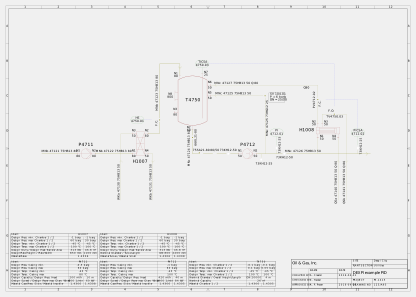
The SVG export renders DEXPI graphical data to SVG format. The core engine is SvgRenderer, which converts DEXPI primitives (polylines, polygons, ellipses, arcs, text) to SVG elements. pyDEXPI's diagram coordinates are Y-down like SVG, so no axis conversion happens here; Proteus files carry mathematical Y-up drawing coordinates, which the Proteus loader flips into this canonical space at load time. On top of this, a set of concrete DrawSVG subclasses handle different scopes:
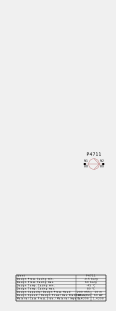
DrawDiagram— renders an entire P&ID diagram to a single SVG, with an optionalprettymode that scales output to A3 and applies thinner line widths.DrawRepresentationGroup— renders a single DEXPI component (e.g. a pump, heat exchanger). Settingshow_node_position=Trueoverlays crosshair markers at each nozzle/connection point.DrawShape/DrawShapeUsage— renders individual symbol shapes including position, rotation, scale and mirroring.
| Full P&ID | Component with node positions |
|---|---|
 |
 |
from pydexpi import load_xml_file
from pydexpi.exports.svg_export import DrawDiagram, DrawRepresentationGroup

dexpi_model = load_xml_file("data/reference_pid.xml")

# Render the full P&ID to SVG
drawer = DrawDiagram(dexpi_model.diagram, padding=5.0, pretty=True)
drawer.save_svg("my_pid", "output/my_pid.svg")

# Render a single component with node position markers. The group is picked by what
# it represents, not by list position: `diagram.groups` also holds Border and Label
# entries, so its ordering is not a stable handle.
component_group = next(
    group
    for group in dexpi_model.diagram.groups
    if getattr(getattr(group, "represents", None), "tagName", None) == "P4711"
)
drawer = DrawRepresentationGroup(component_group, padding=10.0, show_node_position=True)
drawer.save_svg("pump", "output/pump.svg")
Synthetic P&ID Generation
The synthetic data generation module contains code for creating synthetic P&IDs. This method is based on the aggregation of P&ID module templates (or patterns) as described in the publication Toward automatic generation of control structures for process flow diagrams with large language models.
An abstraction of the generation logic allows customization of the procedure underlying the module aggregation. For this, the abstract GeneratorFunction can be implemented as required. An example implementation RandomGeneratorFunction is provided, which selects P&ID modules at random.
P&ID modules can be used in any data representation. For this, suitable abstractions of the Pattern Class and the Connector Class need to be implemented. Sample implementations of patterns and connectors are provided for pyDEXPI instances.
A pattern keys its open connectors by label, so labels are unique within a pattern. When Pattern.incorporate_pattern connects a pattern through one of its connectors, that connector's label is freed, and the incorporated pattern's remaining open connectors are added under their own labels. One of them may take over the freed label, so chaining copies of a module whose only connectors are "In" and "Out" through "Out" leaves the newest "Out" open. Copies of a module with further connectors clash on those, so they must be relabelled first, as ConnectorRenamingConvention does. Any other label clash is refused with a ValueError before anything changes; nothing is renamed implicitly. SyntheticPIDGenerator avoids clashes by giving each sampled pattern's connectors labels that are unique across patterns (ConnectorRenamingConvention), and Pattern.relabel_connector refuses a label another connector of the pattern already has.
📄 View generator architecture UML diagram (PDF)
Example: Generate Synthetic P&IDs
pyDEXPI ships no patterns, so you build a PatternDistribution from your own. The code below generates a pattern with the RandomGeneratorFunction, from distributions you saved earlier with PatternDistribution.save. Each distribution is a subdirectory of the_path.
import os
from pydexpi.syndata import SyntheticPIDGenerator, PatternDistribution
from pydexpi.syndata.generator_function import RandomGeneratorFunction

# Load distributions
the_path = "./my_patterns"

pattern_distr_names = [
    name for name in os.listdir(the_path)
    if os.path.isdir(os.path.join(the_path, name))
]

distributions = [
    PatternDistribution.load(the_path, name)
    for name in pattern_distr_names
]

distribution_dict = {
    distribution.name: distribution
    for distribution in distributions
}

# Create generator and generate pattern
generator_function = RandomGeneratorFunction(distribution_range=distribution_dict)
the_generator = SyntheticPIDGenerator(generator_function, max_steps=5)
syn_pattern = the_generator.generate_pattern("New pattern label")
Next Steps
- Explore the API Reference for detailed documentation
- Check out Applications & References to see pyDEXPI in action
- Visit the GitHub repository for examples and source code